
Changelog
Updates and improvements to CustomerIQ
AI Object Planner, Ticket management, and batch notifications
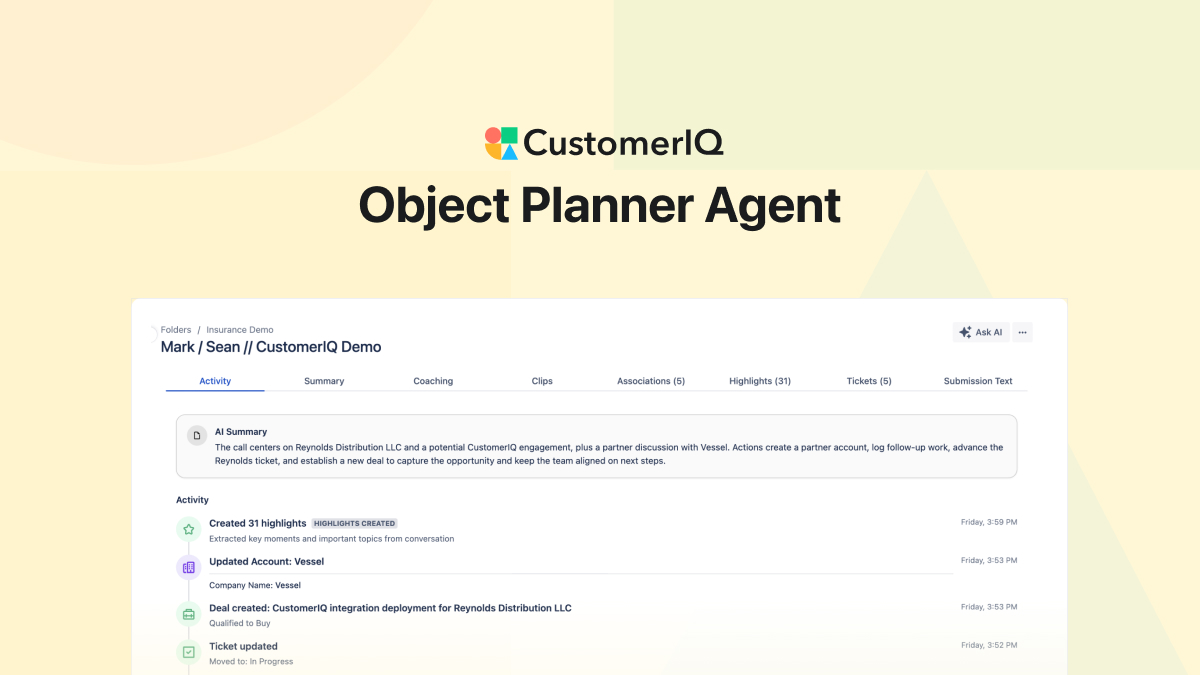
Introducing: Automated CRM Updates
The biggest reason teams don't get value from their CRM? Reps forget to log things. Conversations happen but never make it into the system. Objects get created when a deal closes - if at all. Associations are missing. Supporting contacts on a deal are non-existent. This quietly breaks everything downstream: coaching, pipeline velocity, reporting, forecasts, pipeline visibility, even compliance.
Until now, there's only been one fix: force everyone on your team to manually update every record. The problem is the sheer amount of administrative work this creates. This doesn't just slow down your average rep - it pulls your best performers away from selling and serving customers and places them in admin hell.
Now there's a better way. CustomerIQ handles all of this automatically.
What's New

Object planner
- CRM Object Planner: After every call, meeting, and logged email, the Object Planner AI agent determines what to create, update, and associate across contacts, accounts, deals, and tickets - enriching each object with relevant properties from the conversation.
- Conversation Activity View: You now have a clear summary showing exactly what the Object Planner did and what needs your approval. Admins can configure recommendations to auto-approve or require approval from Settings > Properties & Automations.
- Object Planner Approval Notifications: Users get notified directly in your inbox (or Slack) whenever the Object Planner needs approval to create or update objects based on your logged conversations.
- Approval Settings: Admins have the option to set any recommendation by the Object Planning Agent to auto-approve, require approval, or be ignored completely.
Learn more about Properties and Automation Settings >>

Tickets
- Ticket Creation: A new universal work unit in CustomerIQ. Create multiple ticket pipelines to manage different workstreams with custom stages.
- Object planner: The Object Planner automatically creates tickets from conversations and assigns them to the appropriate pipeline
- Auto-routing: The planner also assigns the ticket to the appropriate person. Every support request, follow-up, and action item now has a home—tracked, assigned, and visible to your whole team.
- Tasks will soon be deprecated (more on that later) but can be viewed in the tickets tab of any conversation
Learn more about setting user roles/responsibilities >>

Batch notifications
- Batch notifications: Now that CustomerIQ can track and update so many things, we wanted to be thoughtful about how we notify users to approve actions and updates. Now, CustomerIQ will notify users of all changes that need approval in batches at 9am, 1pm, and 4pm.
- Notification settings: every user can adjust their notification settings from Settings > notifications
Learn more about notification settings >>
What this means for your team
Your CRM now updates itself.
User-compliance and CRM data integrity is now solved. Your system of record can finally become a system of truth.
In our testing, this didn't just save time, the object planner agent dramatically increased data quality and coverage, making associations and logging contacts that we never would have before because it would require too much work.
This means:
- Accurate reporting: Every conversation is linked to the right contacts, accounts, and deals. Managers get real visibility into what's happening across the team.
- Nothing falls through the cracks: Every work item becomes a ticket, tracked and assigned to the right person.
- Better forecasts: Deals are updated automatically, so pipeline data actually reflects reality.
For HubSpot and Salesforce Users
- Personal email addresses (gmail.com, outlook.com) now associate with the correct company or account
- When multiple deals exist for the same company or contact, the correct deal is updated
- Property enrichment continues to work as before, with improved accuracy across more complex CRM configurations